A Pokémon that follows your cursor.
A tiny desktop companion for macOS and Windows. A pixel-art Pokémon strolls across your screen, chases your mouse, and curls up to sleep when you stop. Or switch on raising mode and battle, catch and evolve it.
Free · no account · installs in seconds.

Small app, lots of charm
Everything runs quietly in the menu bar. Tweak it, then forget it's there.
Menu-bar only
No Dock icon — just a paw in the menu bar. It stays out of your way.
Physics-based following
The character keeps its distance and moves with its own speed and acceleration, so it feels alive rather than glued to the cursor.
8-direction animation
Sprites turn to face wherever they're walking, in true pixel-art style.
Idle → sleep
Stop moving and it settles down, then falls asleep. Move the mouse and it wakes right up.
251 Pokémon
All of Gen 1 & 2, with alternate-color variants for 124 of them. Pick with a preview, arrows, or a random button.
Raising mode
Wild encounters, on-screen auto battles, EXP and evolution, catching with Poké Balls, a six-mon party and a bag of items.
Click-through & multi-monitor
A transparent overlay that never blocks your work, and crosses between displays seamlessly.
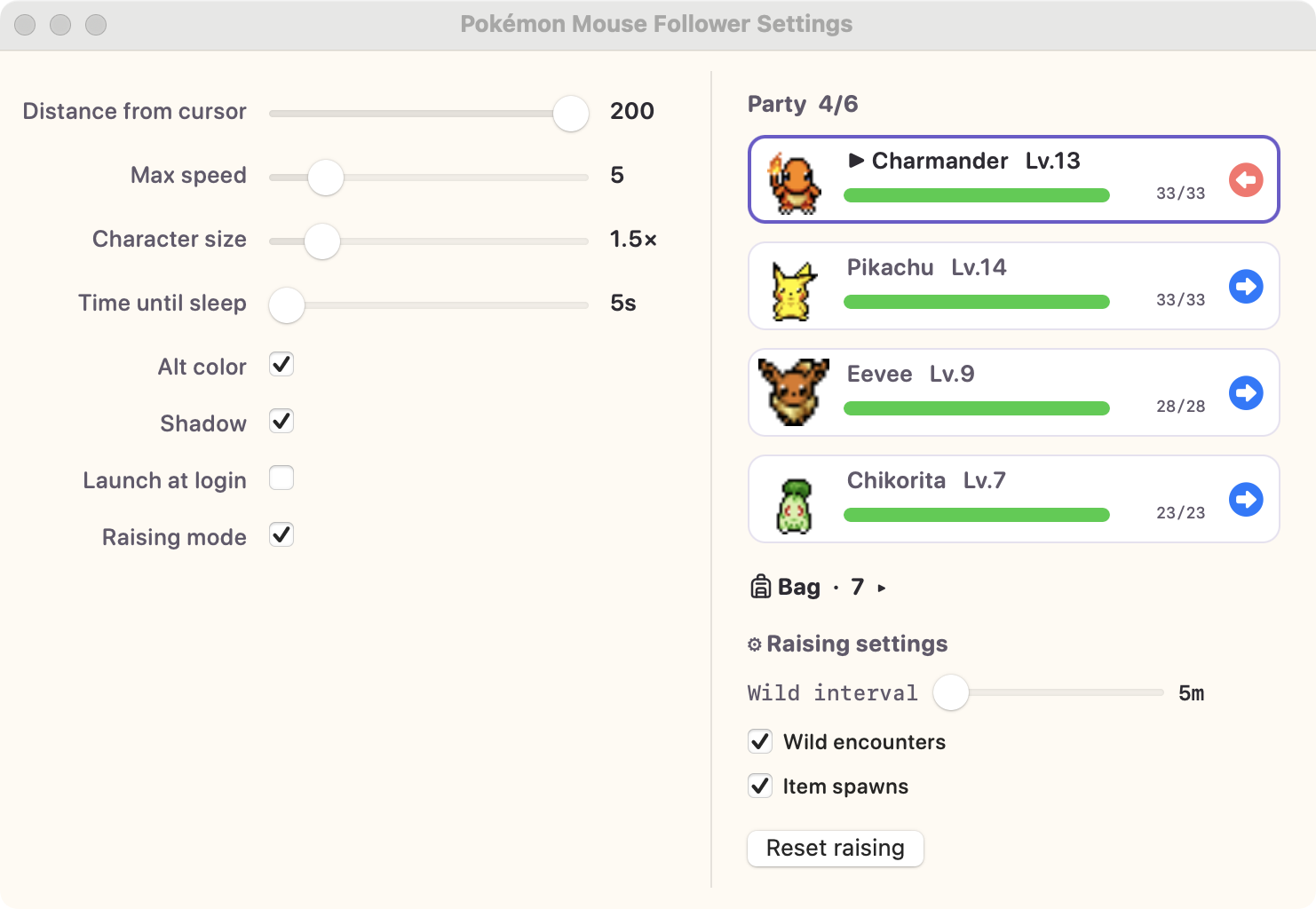
Raising mode
Turn the follower into a Pokémon you actually raise. Pick one of the six classic starters, then:
- Wild Pokémon wander onto your desktop — walk into one and an auto battle plays out on the overlay, with type match-ups, move effects and status conditions
- Wins grant EXP: level-ups float over its head, new moves are learned, and evolutions play the classic white-out scene
- Catch weakened wilds with Poké Balls and build a party of up to six
- Items drop on the desktop — walk over them and use potions, balls and evolution items from the bag
- Hurt members rest up out of battle (faster while napping) and the whole party heals at midnight
Battles play out right on your desktop
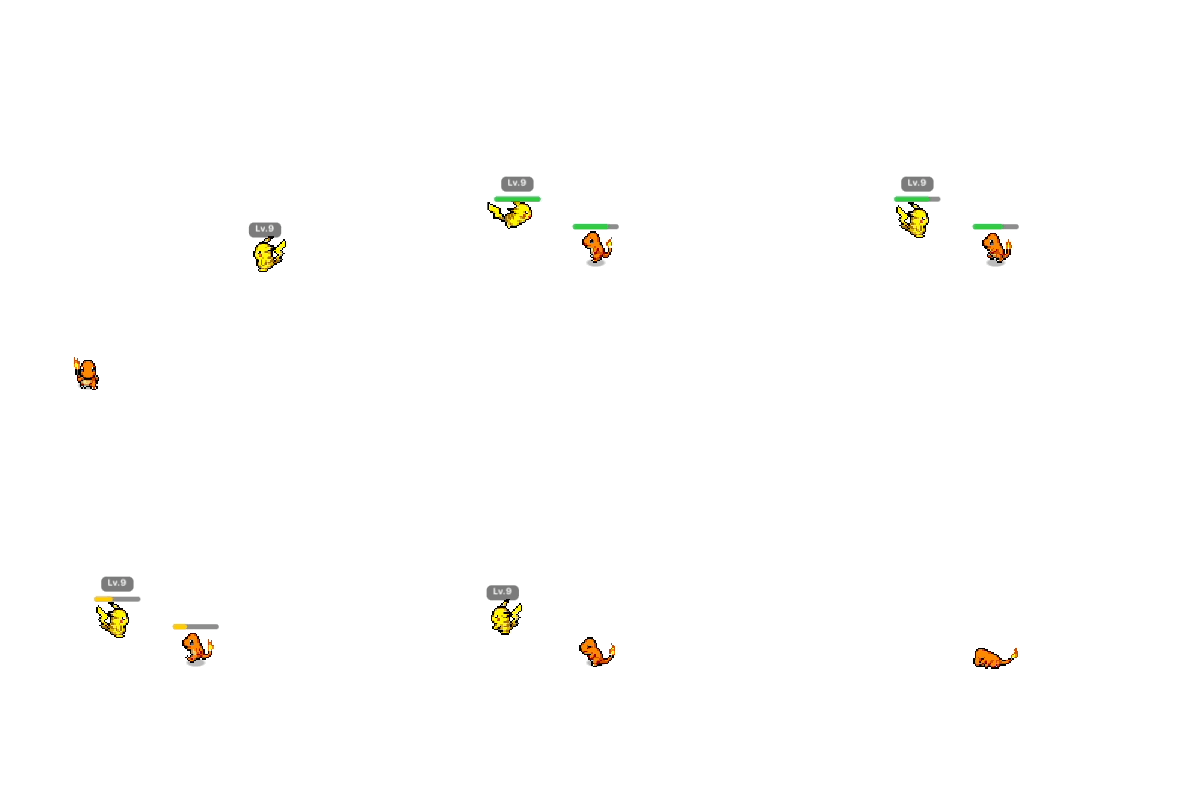
Walk your follower into a wandering wild and the two square off where they met — no separate battle screen:
- Turn order follows Speed, and every move fires with its pixel effect — projectiles, lunges, full-screen flashes
- Type match-ups pop up as "Super Effective!" tags; status conditions play out visibly (Zzz, burn flames, paralysis sparks)
- HP bars drain over each combatant's head — win for EXP, throw a ball at a weakened wild, or recall to flee once the turn ends, mainline style

Pick up items, catch with Poké Balls
Every so often an item lands somewhere on your desktop — walk your follower over it to pocket it:
- Poké Balls and potions drop often; evolution stones, revives and trade-style items are the rare finds
- Turn on capture in the bag and your mon throws a ball mid-battle once a weakened or statused wild looks catchable — the ball arcs, wobbles, and clicks shut
- A caught wild joins the party (up to six); swap who follows the cursor anytime, and use potions or evolution items from the panel
Make it yours
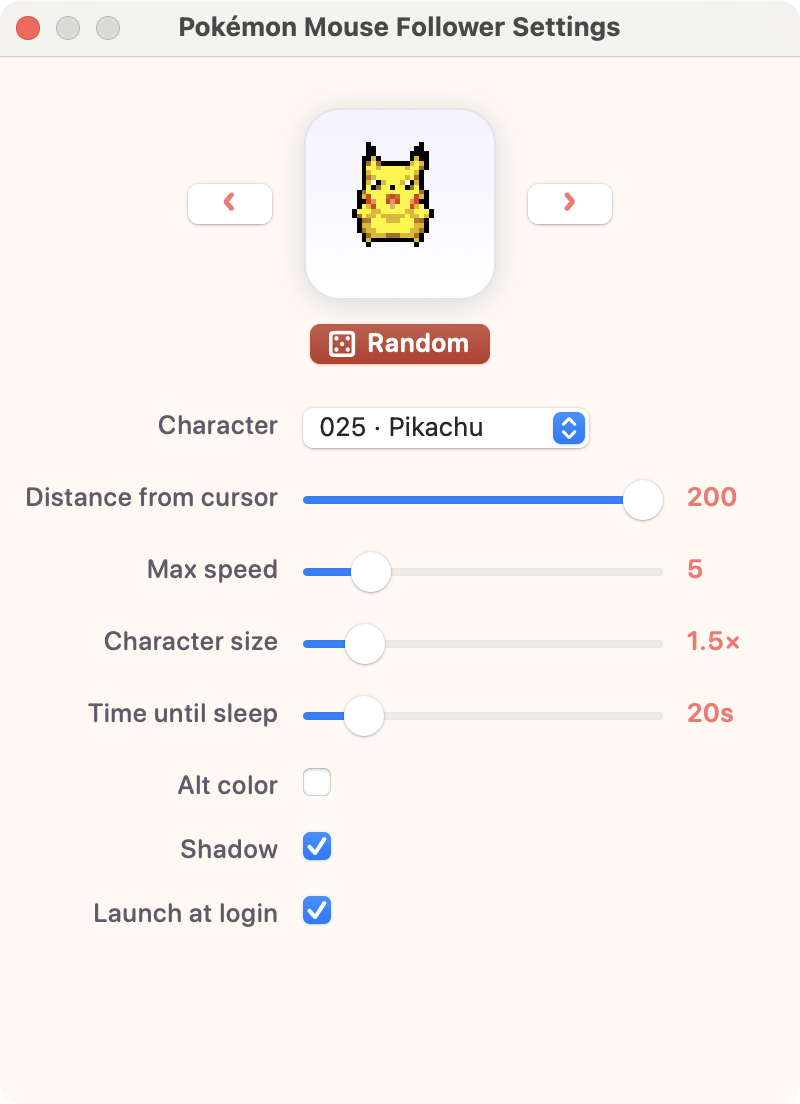
Open Settings from the menu bar and every change applies instantly:
- Live preview of the selected character, with ◀ ▶ arrows and a Random button
- Distance from the cursor, max speed, character size
- Time until it falls asleep
- Alt-color sprites and a soft ground shadow
- Launch at login
How it behaves
Movement is independent of mouse speed — if you dash, it lags behind and then catches up at its own pace.
walk  →  stop  →  idle  →  [time until sleep]  →  sleep
                                          ↑ cursor moves ↓
                                          └──── walk ────┘
Install in 30 seconds
No developer tools needed — pick your platform.
macOS
Download
Grab the latest .dmg from the Releases page and open it.
Drag to Applications
Drop Pokémon Mouse Follower into your Applications folder.
Launch
Open it from Launchpad. A 🐾 appears in the menu bar and your Pokémon starts following the mouse.
⊞ Windows
Download
Grab PokemonMouseFollower-Setup.exe from the Releases page (or the portable .zip).
Run the installer
If SmartScreen warns, click More info → Run anyway — the app isn't code-signed, but it's open source. No admin rights needed.
Launch
The app lives in the system tray; right-click the tray icon for settings, pause and updates. Raising mode is coming to Windows in a later release.
Frequently asked questions
What is Pokémon Mouse Follower?
It is a free, open-source desktop app for macOS and Windows. A pixel-art Pokémon character walks around your screen and follows your mouse cursor, keeping a small distance and moving with its own speed and acceleration.
Is it free?
Yes — completely free and open source. You can read the full source code on GitHub.
Which platforms are supported?
macOS 13 (Ventura) and later on both Apple Silicon and Intel Macs (a universal build), and Windows 10 (1809) or later on x64. Raising mode is currently macOS-only — it's coming to Windows in a later release.
Does it slow down my computer or block clicks?
No. It's a lightweight app drawn on a transparent, click-through overlay, so it never blocks the apps underneath. On macOS it lives in the menu bar with no Dock icon; on Windows it lives in the system tray.
How many Pokémon can I choose from?
251 Pokémon from Generations 1 and 2, plus alternate-color sprites for the 124 that have them. You can browse with a live preview, arrows, or a random button.
What is raising mode?
An optional mode where the follower becomes a Pokémon you raise. Wild Pokémon appear on your desktop, auto battles play out on the overlay (type match-ups, move effects, status conditions), wins grant EXP and evolutions, you can catch wilds with Poké Balls, and you manage a party of up to six with a bag of items. Progress is saved automatically.
How do I install it?
macOS: download the .dmg from Releases, drag the app into Applications, and launch it. Windows: download and run PokemonMouseFollower-Setup.exe; if SmartScreen warns, click More info → Run anyway. No developer tools needed on either platform.
How do I uninstall it?
macOS: click the 🐾 menu-bar icon → Quit, then drag the app from Applications to the Trash. Windows: quit from the tray icon, then uninstall from Settings → Apps like any other program.
Where do the sprites come from?
The pixel animations are from PMD Sprite Collab, a community project. This is a non-commercial personal fan project; Pokémon © Nintendo / Creatures Inc. / GAME FREAK inc.